
Insights
The Insights page is where a month gets read back to you. It is the one page you sit with rather than act on.
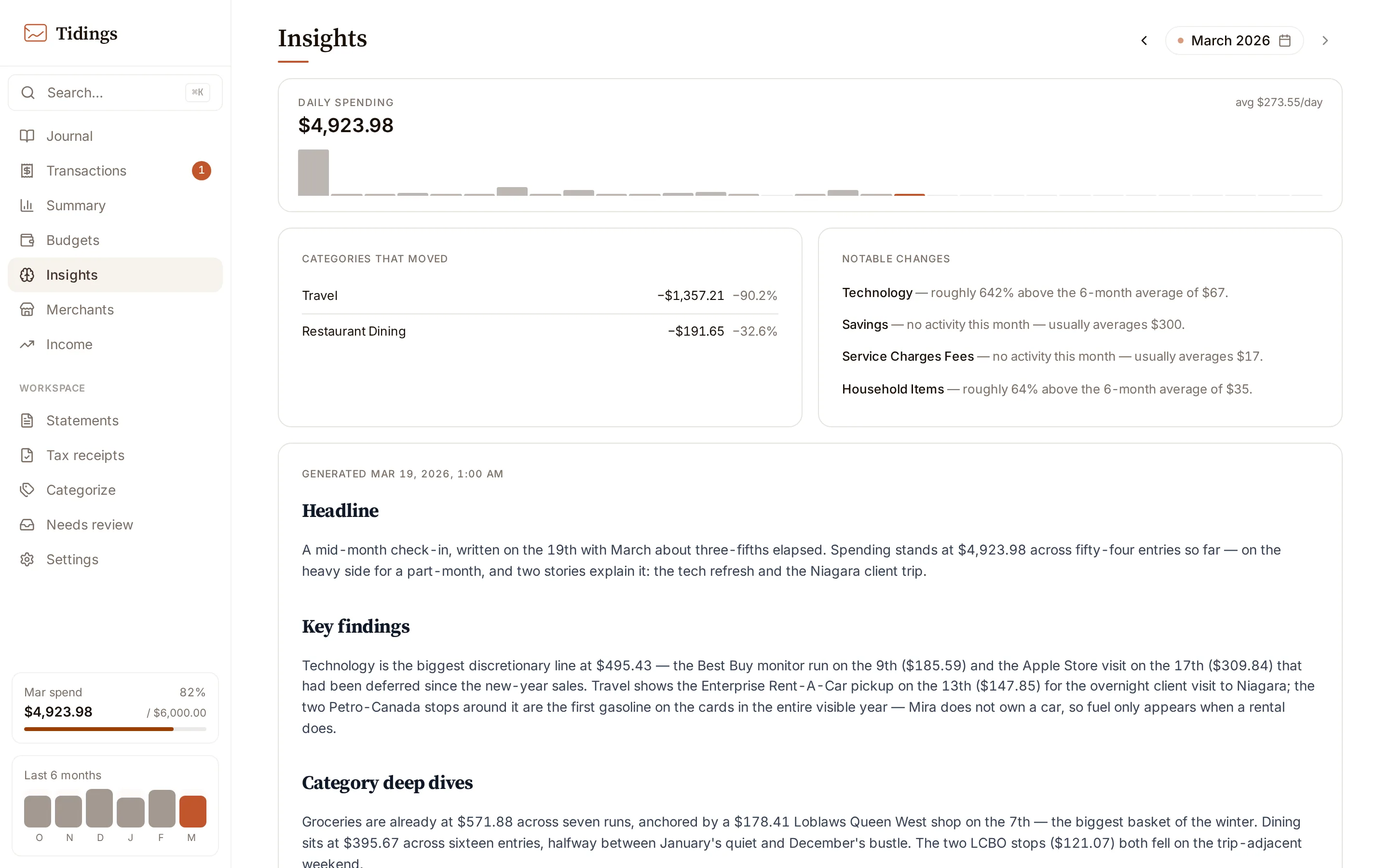
Two layers
Section titled “Two layers”The cards at the top — momentum against last month, and the month’s quiet anomalies — are computed directly from your transactions. No model is involved, so they are always present once the month has data, and they read the same every time. The briefing sits below them. It is the generated part, and it is optional: you can look at the cards for a month you have never generated a briefing for.
What a briefing covers
Section titled “What a briefing covers”A briefing follows a fixed shape, the same every month: the month in brief, what changed, where the month went, worth attention, your notes, and looking ahead. The sections are set in the prompt, so successive months read as the work of one steady hand rather than a fresh take each time. Generation runs in the background, one month at a time, and usually finishes in about 30 seconds. The provider, model, and reasoning effort come from task routing in settings — a briefing runs only once you have configured a provider there.
What Tidings sends
Section titled “What Tidings sends”The briefing is the one place Tidings hands a slice of your finances to a model, so it is worth knowing exactly what goes across. The context is: this month’s summary and the previous month’s, six months of trend, your budget targets and the pace math derived from them, the notable category changes and anomalies, the month’s largest transactions, any notes you wrote on individual transactions, and the continuity signals below. You can inspect the exact context a briefing sees — it is served read-only in the app, so nothing is hidden from you.
Continuity
Section titled “Continuity”Alongside the numbers, Tidings gathers a set of continuity signals so a briefing can speak across time rather than in isolation: the same month one year ago, categories that recur only once or twice a year, flat recurring charges like a mortgage or strata, merchants you usually mark ignored, an excerpt of last month’s briefing so this one can follow up on what it raised, and your standing briefing memo from Settings → Intelligence. The memo is free text you write once; it shapes every briefing after.
Every figure is checked
Section titled “Every figure is checked”After a briefing is generated, Tidings traces each dollar amount and percentage in it back to the underlying context. If a figure does not match, the page says so, naming how many did not trace. Silence is the success state — when nothing is flagged, every figure checked out. A flagged briefing is still saved; the check rides alongside it rather than blocking it.
Where briefings live
Section titled “Where briefings live”Briefings are written to disk on your machine, under data/insights/, as plain markdown. The page lists what has been saved for the month, newest first, and you can regenerate at any time — each run is saved separately, so a regeneration never overwrites the last one.